Posts

Kerala Government - Links to various self government certificates

There are a lot of facilities provided online by the Government of Kerala so that the common man does not need to go to the various government offices. Here are some of the links to various sites to get the certificates. Kerala Government Website: https://kerala.gov.in/ This site has links to various services. e-Services link: https://kerala.gov.in/service This link provides the list of all e-services available. Online Services: https://kerala.gov.in/online-service-links Registration department: http://keralaregistration.gov.in/pearlpublic/ Building Permit: https://buildingpermit.lsgkerala.gov.in/Content/LoginG.aspx Water authority bill payment: https://epay.kwa.kerala.gov.in/ KSEB current bill payment: https://wss.kseb.in/selfservices/ E-Treasury: https://etreasury.kerala.gov.in/ To obtain the services, you need to create an account with the site which is quick. You need to provide and email and mobile number. Link: https:/...
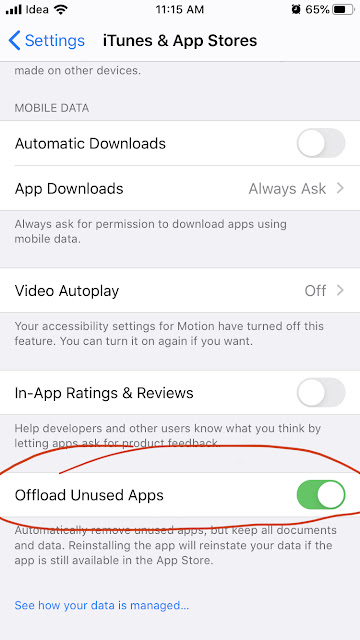
How to delete an app in iPhone while preserving the data? Offloading apps manually and automatically in iOS

Image
The iOS have a feature that is called 'Offloading' app that can be used to delete the app and recover space, at the same time preserve the data and also the icon on the device itself. You might have wondered why there is a small cloud symbol to the left side of the name of some of the apps. These apps are offloaded. This comes very handy when you doesn't require some heavy apps once in a while. In that case you can offload the app when not required and restore from app store in one click. Note: The app can be restored only if it is still available in app store.

Is India heading for a recession or is it the millennial being rational?

There is a slowdown in the automobile sector and the sales did not boost up during the festival season 2019. Even with the government providing stimulus, the car sales didn't pick up. There is another news about "Amazon.in sells Rs 750 cr worth of premium smartphones; Flipkart sees 2X growth on day 1" ( source ). Well that is a whopping 750 crore just for the premium smartphone by one seller in one day. And the total sales would be very much higher this festive season. So, can we consider the slow down in automobile sector as a sign of an economic slowdown?

iOS 13.1 heats up iPhone

The iOS 13.1 was released recently and using the iPhone for a while makes it build temperature to the  area near the camera. This is the area where the microprocessor A10 chip is located. So while it means the processor is working hard doing regular jobs, it is noted that the phone is heating up when the dark mode is enabled. Using the phone with normal mode doesn’t appear to heat it too much. I am monitoring the issue and will post an update soon. *** UPDATE After each update, most of the apps needs to be configured on first use. So, immediately after the update the apps will take more processing power to configure. After that things will return to normal.

How to delete an app is iOS 13? - Solution

Image
Apple have removed the 3D touch feature from iOS 13 as earlier rumored. To delete an app we had to long press the app and all the apps start wiggling in the screen with a (x) mark to the top end of the icon. Clicking the icon will uninstall the app. Now, long pressing the app does not make the apps wiggle in iOS 13. So how do you delete an app? The feature is moved to the menu that opens when you long press the app. It is renamed to 'Rearrange Apps'. When you click 'Rearrange Apps' the apps starts to wiggle and an (x) mark show to the right top section of all apps those can be deleted.

മലയാളം കലണ്ടർ ആപ്പ് ഡൌണ്‍ലോഡ് ചെയ്യാതെ നിങ്ങളുടെ സ്മാർട്ട്‌ ഫോണിൽ ഉപയോഗിക്കാം - Use Malayalam Calendar in your smartphone without downloading app.

Image
നിങ്ങളുടെ സ്മാർട്ട്‌ ഫോണിൽ മലയാളം കലണ്ടർ ഉപയോഗിക്കാം. ആപ്പ് ഡൌണ്‍ലോഡ് ചെയ്യാതെ. ഈസിയായി.  https://www.obidostech.com/malayalam-calendar/ Just send a mail to obidostechnologies@gmail.com with the subject: Calendar Subscription and you will get the calendar on your device. നിങ്ങളുടെ ജിമെയിൽ  നിന്നും 'obidostechnologies@gmail.com' എന്ന ഈമെയിലിലേക്കു 'Calendar Subscription' എന്ന് ഒരു മെയിൽ അയക്കുക. ഉടൻ തന്നെ കലണ്ടർ ലഭിക്കുന്നതാണ്. എന്നിട്ടു താഴെ പറയുന്ന രീതിയിൽ നിങ്ങളുടെ ഫോണിൽ ഇനേബിൾ ചെയ്യുക. ഇ നി നിങ്ങളുടെ Andriod ഫോണിൽ Calendar ആപ്പ് തുറക്കുക . . കലണ്ടർ ആപ്പിലെ മെനു അമർത്തുക  നിങ്ങൾക്ക് ലഭിക്കുന്ന മെനുവിൽ നിന്നും Settings തിരഞ്ഞെടുക്കുക . അടുത്ത് ലഭിക്കുന്ന സ്ക്രീനിൽ Show More ക്ലിക്ക് ചെയ്യുക . അടുത്ത സ്ക്രീനിൽ നിന്നും മലയാളം കലണ്ടർ ക്ലിക്ക് ചെയ്യുക. എന്നിട്ട് Sync ബട്ടണ്‍ On ആക്കുക. ഇപ്പോൾ നിങ്ങളുടെ Android ഫോണ്‍ കലണ്ടറിൽ മലയാളം കലണ്ടർ കാണാം. അഭിപ്രായങ്ങളും സംശയങ്ങളും  Commen...

Printable A4 World Countries map with complete Indian territory

Image
This is a A4 size printable world map for study purposes. It includes the complete Indian territory. Right-click on the image and download.