Posts

Showing posts with the label automatic

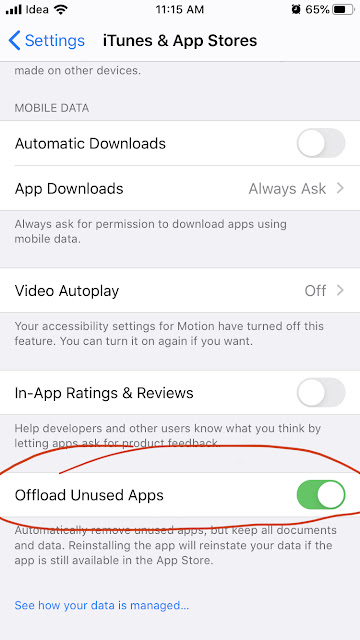
How to delete an app in iPhone while preserving the data? Offloading apps manually and automatically in iOS
Image
The iOS have a feature that is called 'Offloading' app that can be used to delete the app and recover space, at the same time preserve the data and also the icon on the device itself. You might have wondered why there is a small cloud symbol to the left side of the name of some of the apps. These apps are offloaded. This comes very handy when you doesn't require some heavy apps once in a while. In that case you can offload the app when not required and restore from app store in one click. Note: The app can be restored only if it is still available in app store.

Sync events using iCalendar format with Google Calendar / MS Outlook / Apple devices without using APIs.

We can create a calendar file in iCalendar format and this file can be used by compatible applications like Google Calendar, MS Outlook and Apple devices for synchronizing the events automatically. The process is simple. We need to create the calendar file (with extension .ics) in a publicly accessible URL and add the URL to the applications. The applications will check the URL at preset intervals and update the events as per the .ics file. Google Calendar have their own interval settings, so the event synchronization may be a bit delayed.

Automate Tortoise SVN update in Windows

As a developer you will be experienced with SVN for source control in collaborative development environment. One of the popular clients for SVN in Windows is Tortoise SVN. You can right click in the SVN folder and update the contents of the folder from SVN. But, when you have a number of SVN folder, will it be a good idea to automate the SVN so that your files are in sync always. You will need to create a batch (.bat) file for this process. It is very simple.